Before you can publish your app to the App Store or Google Play, it’s essential to provide legal policies like Terms of Service (ToS) and a Privacy Policy (PP).
Without these, your app will get rejected during the review process. Luckily, Audiorista makes it easy to add and manage these policies, whether you use our templates or link to your website.
Table of Contents
- Where to find the general section
- Changing your app’s display name
- Adding or editing legal policies
- Where these policies appear in your app
- Plan differences: Language settings
Where to find the general section
To get started, head to the My App → General section.
Changing your app’s display name
The first field you’ll see is Name. This is your app's display name. It’s the name that appears under your app icon on a user's device home screen.
Example: If you set the display name to SoundSpace, that’s exactly what your users will see below the app icon on your phone's home screen once they download your app.
Tip: Keep your app name short and clear. Long names might get cut off.
Adding or editing legal policies
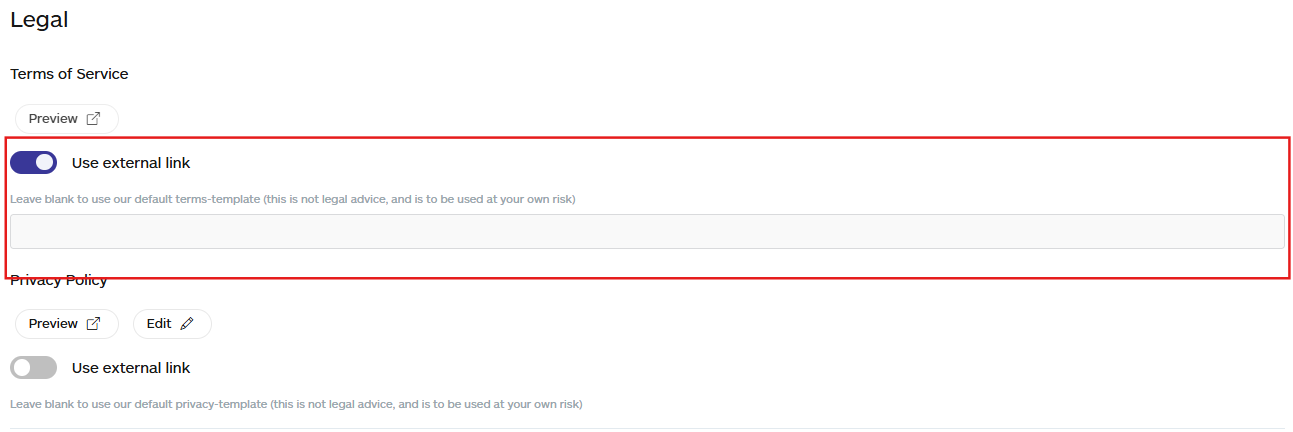
Next, you'll see the Legal section; this is where you add your Terms of Service (ToS) and Privacy Policy (PP).
You have two options:
- You can use Audiorista’s templates.
- Link to your existing policies on your own website.
Using Audiorista’s templates
Our templates are a helpful starting point, but they are not legal advice. You should always review and adjust them to fit your business.
To edit:
✔️ Click Edit next to the policy you want to change.
✔️ Make your edits.
✔️ Click Submit to save
Using external links for legal policies
You can also delete the template entirely and paste in your own policy text.
If your Terms of Service or Privacy Policy are already published on your website, you can simply link to them.
Here’s how:
✔️ Toggle Use External Link
✔️ Paste the full URL of your policy
✔️ Click Save in the bottom-right corner
Where do these policies appear in your app
Once added, your legal policies will automatically be shown in the places required by app stores, including:
✅ Login screens
✅ Paywall screens
✅ Settings screens
This ensures your app meets legal requirements and offers transparency to your users.
Important: Without valid ToS and PP, your app will be rejected during App Store or Google Play review.